

Keeping your WooCommerce products up to date helps your customers see the correct information before they make a purchase. Whether you need to change a product’s price, description, or weight, WordPress makes it easy.
Follow the steps below to update your WooCommerce product details.
Step 1: Log In to WordPress
Go to your WordPress login page and sign in using your username and password.
Step 2: Open Your Products
From the left-hand menu, click Products. You’ll see a list of all the products on your website.

Step 3: Select the Product
Find the product you’d like to make changes to. Hover over its name and select Edit.

Step 4: Update the Product Details
On the product editing screen, you can update different parts of the product.
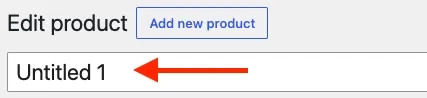
Change the Product Name
At the top of the product editing page, you’ll find the product title. Update the name as needed.
Update the Product Description
Edit the main description to add new information or correct existing content.

Long description box

Short description box
Change the Product Price
Scroll down to the Product data section. Under the General tab, update:
- Regular price
- Sale price (if applicable)

Update the Product Weight
In the Product data section, click the Shipping tab. Enter the new Weight and save your changes.

Step 5: Save Your Changes
Once you’ve finished editing the product, click the Update button in the top-right corner. Your changes will now appear on your website.

Check Your Product
Visit your website and open the product page to make sure everything looks correct.
Confirm that:
- The product name is correct.
- The description displays properly.
- The price is updated.
- The weight has been saved (if applicable).
Need help? If your website is managed by myheartcreative, our team is happy to assist with updating your WooCommerce products or answering your WordPress questions.